Notes on Programming Logic
Image Cropping (Crop)
An astro-image should not have fringing at the edges, as this interferes with aesthetics and can specifically cause operations like gradient removal to fail. The following illustration demonstrates the strategy chosen by InstantSiril for image cropping:
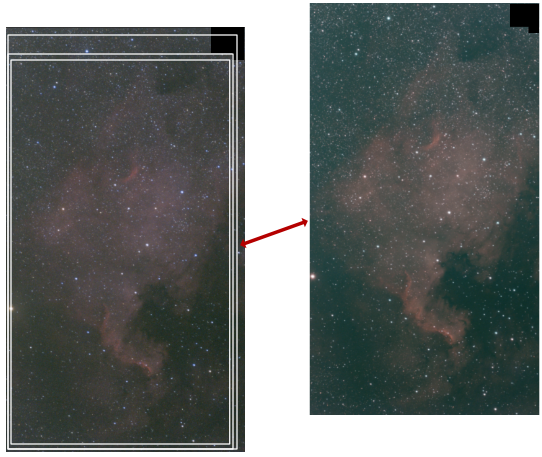
On the left, the resulting image is shown with three crops from the outside in. On the right, the stacked image from the Seestar software is shown as an illustration. In the first step, the resulting image is cropped to match exactly the image area of the Seestar software reference. This is why a stacked image should always be copied into the source directory. It is used exclusively for cropping and nothing else. If no stacked reference image can be found, the first image in the sequence is used as an alternative.
In the second step, it is checked whether the image has deep black border areas, as illustrated in the upper right corner. If this is the case, the image will be cropped to remove this area. This can occur with mosaic images.
As a final third step, the image is once more cropped uniformly by percentage at the edges, according to the settings provided.
Mixing IR-Cut and LP Images
Images with an IR-Cut filter (RGB) and a Light-Pollution filter (Dual-Narrow-Band) can be mixed. They can simply be placed in the same source directory. InstantSiril recognizes this, processes both variants separately at first, and then mixes them into a single final image. In this configuration, the stars from the IR-Cut sequence are always used.
If "Stretching with VeraLux" is activated in the settings, InstantSiril assumes that the user wants to perform the final image processing steps themselves; it additionally generates an Ha and OIII channel from the Light-Pollution data and provides this data as a star-free result.
Image Depth
The more image data available, the better. Naturally, processing time and data volume will increase accordingly. Depending on the number of images, InstantSiril uses various stacking algorithms internally and attempts to push the optical resolution limit via Drizzle. The final image may potentially have a slightly higher resolution than the used camera sensor. Long exposure times thus contribute to resolution improvement, and weaker signals become visible in the image. One can collect image data of the same object over several nights.
Data Preparation
Poor image data is counterproductive to the final result. All original images should be reviewed once, and bad images should be deleted. I use the "Browser View" of the program "GraphicConverter" for this purpose. The program can read practically all graphic file formats, including .fit files. In the Browser View, you can quickly scroll through the list and delete bad images directly.
Focus on Deep Sky
InstantSiril is designed for processing files from deep-sky captures taken with the Seestar telescope. Relevant information for processing is read from the filenames. The program was tested with the S30-pro model, and I assume that other Seestar models produce files with the same naming convention. The current version is not suitable for processing comets, as it is calibrated exclusively on stars.
Film Emulation
The film emulation is a small, not-too-serious gimmick. I have attempted to replicate the feel of certain Fuji films. If this option is selected, an additional file with the emulation is created. You can then compare whether you prefer it over the "normal" result.
Result Variety
InstantSiril always saves several versions of the resulting image—for example, essentially providing both the linear version and the stretched version. This gives the user the option to choose what fits their preference, such as a direct result for a quick Instagram post or a version that can be significantly improved through further image processing steps.
Processing Log
During image development, a log file named "object_data.txt" is created. This can be saved to track which parameters the software used at a later date.
The template can contain the following variable placeholders and control sequences:
Variables
- (Objectname) – Name of the captured object, derived from the source files
- (DD) – Date of capture: Day
- (MM) – Date of capture: Month
- (YYYY) – Date of capture: Year
- (Devicename) – Name of the capture device as set in the settings
- (IRCUT-Count) – Number of captures with IR-Cut filter
- (IRCUT-Time) – Length of a single capture with IR-Cut filter in seconds
- (LP-Count) – Number of captures with LP filter
- (LP-Time) – Length of a single capture with LP filter in seconds
- (Integrationtime) – Total exposure time in hours
- (BGE) – Module used for gradient removal
- (Denoise) – Module used for denoising
- (Denoise Amount) – Strength setting for denoising
- (Deconvolution) – Module used for image sharpening
- (DC non-Stellar) – Strength of image sharpening for images without stars
- (DC Stellar) – Strength of image sharpening for stars
- (Star Removal) – Module used for star removal
- (Savety Crop) – Image cropping according to preset settings
- (Drizzle Factor) – Image enlargement factor via Drizzle
- (Drizzle Kernel Size IRCut) – Drizzle kernel size for IR-Cut captures
- (Drizzle Kernel Size LP) – Drizzle kernel size for LP captures
Control Sequences
- ###ircut: :ircut### – The text between these expressions appears only if captures with an IR-Cut filter are present.
- ###lp: :lp### – The text between these expressions appears only if captures with an LP filter are present.
- ###IRandLP: :IRandLP### – The text between these expressions appears only if both IR-Cut and LP filter captures are present.
Data Management
Basically, no source data is modified. InstantSiril always works with local copies. If local settings are made, a text file is added to the source directory. This is the only exception regarding the modification of the data source.
When executing InstantSiril, all files in the "InstantSiril" folder within the Siril working directory are deleted, and working copies for the new processing task are created. Files created directly by InstantSiril within the Siril directory are not deleted and may be replaced by identically named results from the current task.
>>> Application Examples
>>> Back to the Table of Contents